Stuck choosing between PNG vs WEBP? We compare file size, quality, and SEO impact. Discover the best image format for faster websites today.
Introduction
You may desighn a amazing website like a professional. However, it has one major flaw. It takes a long time to load. Best transparent PNG and WEBP Maker
Why is this a problem? Because the images are too heavy. Making them load faster is a question of the right file format. Which format is the winner and makes your website faster? Is it PNG or WEBP?
Traditionally, PNG has always been the format of choice. However, Google created WEBP. WEBP claims to have a smaller file size and maintain a high level of transparency and clarity. If you are worried about how images load on your website, you definitely want to know the answer to this question.
Let us finally end this debate.
What Exactly is PNG? (The Classic Choice)
You can design an outstanding website just as professional ones do. But this kind of website has its drawbacks. This drawback is slow loading speed.
What is wrong with that? First of all, because the images are quite bulky. Solving this problem is about the format used for images. What format will make your images load faster – PNG or WEBP?
PNG used to be the best solution. But Google introduced WEBP. WEBP guarantees more compact images with the same quality level. When you think about fast image loading speed, you surely should find out which one to choose.
Let us stop arguing once and for all.
What is WEBP? (Google’s Modern Hero)
WEBP is officialy launched in 2010. Google may be desighned webp to beat all other Formats like JPEG or png.
Why people love WEBP:
- This Format is mostly like png
- Mostly supprted transparency background
- This format is fast loading in website and make site fast loading
in some cases Mostly users can not make difference between PNG vs WEBP. But Google bots are algorithms that can easily understand the formats.
PNG vs WEBP: 5 Key Differences (Side-by-Side)
Let’s break down the PNG vs WEBP file size battle and other factors.
| Feature | PNG | WEBP |
|---|---|---|
| File size | Larger (lossless) | 25–35% smaller |
| Transparency | Yes | Yes |
| Browser support | 100% | 96% (all modern browsers) |
| Compression type | Lossless only | Lossy & lossless |
| Best for | Logos, screenshots | Photos, web graphics |
1. File Size Showdown
A typical PNG screenshot (1200×800) = 500 KB. The same image as WEBP = 320 KB. That’s nearly 40% savings without visible quality loss.
2. Quality Comparison
For product photos, WEBP often looks identical. For sharp text overlays or detailed icons, PNG still wins slightly. But modern WEBP encoders have closed that gap.
3. Browser Support Reality Check
All major browsers—Chrome, Edge, Firefox, Safari—now support WEBP. The only holdouts? Some old Android browsers and Internet Explorer (RIP). So unless your audience uses ancient tech, WEBP for SEO is safe.
Which is Better for SEO? (The Honest Answer)

Google’s core web vitals prioritize loading speed. Faster images = better user experience = higher rankings.
WEBP wins for SEO because:
- Smaller files improve Largest Contentful Paint (LCP)
- Reduces bandwidth usage
- Google’s own format gets a subtle edge
But here’s the nuance. If you swap a PNG for a blurry WEBP, that hurts SEO. Always test quality. WEBP vs PNG for websites isn’t about format alone—it’s about balance.
How to Convert PNG to WEBP (3 Easy Methods)
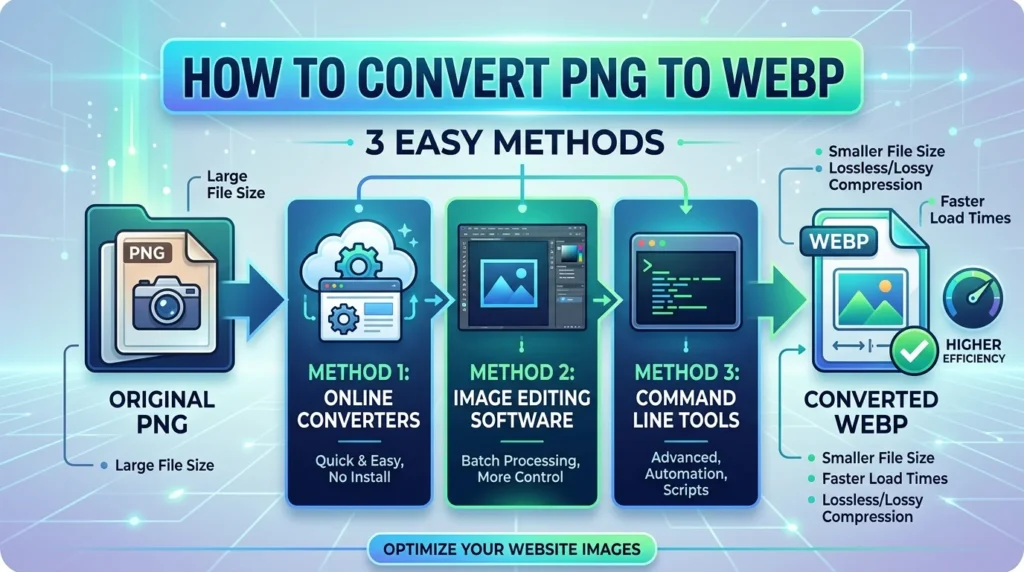
Ready to switch? Here’s your action plan for convert PNG to WEBP:
Method 1: Online Converters
- Squoosh.app (Google’s free tool)
- CloudConvert
- Drag, drop, download done in 10 seconds.
Method 2: WordPress Plugins
- Smush or Imagify auto-convert uploads to WEBP
- Serves WEBP to compatible browsers
Method 3: Command Line (Advanced)
bash
cwebp -q 80 image.png -o image.webp
Conclusion: So, PNG or WEBP?
For most websites, WEBP is the better choice. It delivers smaller files, solid quality, and a clear SEO boost. Your visitors get faster pages, and Google notices.
But don’t delete your PNGs. Keep them for logos, design mockups, and images with sharp text. Better yet, use a plugin that serves WEBP to modern browsers and PNG as a fallback.
Your next step: Run your homepage through Google PageSpeed Insights. If image size is flagged, start converting your largest PNGs to WEBP today.
FAQs
1. Does WEBP lose quality compared to PNG?
Not noticeably. At 80–85% quality, most WEBP images look identical to PNG. Only for pixel-perfect graphics (like UI elements) does PNG have a slight edge.
2. Is WEBP supported on all browsers?
Yes—96% globally. Chrome, Edge, Firefox, Safari (14+), and mobile browsers all support WEBP. Only very old browsers like IE11 don’t.
3. Can I use both PNG and WEBP on the same site?
Absolutely. Use the <picture> element to serve WEBP to compatible browsers and PNG to others. WordPress plugins like Smush do this automatically.
4. Does converting PNG to WEBP help SEO?
Yes. Smaller images improve page speed, which boosts Core Web Vitals scores. Faster sites tend to rank higher, so WEBP for SEO is a smart move.
5. What is the best image format for websites in 2026?
For most content: WEBP. For icons, logos, and crisp text: PNG. For photos with no transparency: AVIF is emerging, but WEBP is the safe, proven winner today.